
Table of Contents
Getting Started with Intune
Are you just getting started with Intune? Well we’re here to help. Whether you’re asking yourself “What is Intune?” or “Why do I need it?,” this quick read will give you all the details you’ll need to make an educated step forward.
What exactly is Intune and how can it help me protect my data?
Microsoft Intune is a Mobile Device Management (MDM, for short). In short, it’s a platform that gives you visibilty and control over how company data is accessed. The next logical question is well “Why do I need it?.”
Why you need Intune?
Besides the standard answers you’ll be given by sales “to meet compliance” or “to satisfy your cyber insurance agent,” the truth is without it you have no idea who is doing with what with your data. Implementing Intune or another MDM solution gives you the ability to have Judy from Operations only access data on resources that are registered with your company. If Judy’s device gets stolen or she leaves, you can wipe an company data from her device and your data stays protected.
Difference between MDM vs MAM
Now I wish there were an easy button for all things in life, but unfortunately Intune just isn’t one of them. You’ll need to make a ton of decisions along the way, such as:
- What data do I need to protect?
- What devices do I need to protect?
- How impactful to your employees do you want this to be?
These will inevitably send you to the conversation of MDM vs MAM. So we’ve mostly covered MDM, but what is MAM? Think of MAM as a watered down version of MDM, that semi-protects your data with a minimal impact to your employees.
Mobile Application Management (MAM)
Enables limited control of security settings
- Application Control Access (PIN, Biometrics, etc.)
- Encryption verification (with App Pin or Device PIN verification)
- Data Loss Prevention (can limit copy-paste between unmanaged applications)
- Does not require Enrollment
Mobile Device Management (MDM)
Enables full device management
- Configuration Policies
(Wifi, Encryption, etc.) - Compliance Policies (Validation checks)
- Ability to Install Apps
- Full Device Wipe
- Requires Enrollment
As you can see MDM is much more robust in it’s ability to fully control devices and thereby protect that data that may reside on them. It provides an amazing experience for employees as they’re able to automatically receive company settings and apps that may be of interest. The drawback is that it does require an enrollment, which is a minimally impactful process.
Alternatively, MAM provides protection of your M365 apps and data with minimal user involvement. Note, that MAM only works with “enlightened” apps, that is apps that integrated with the Intune SDK. Microsoft keeps an up-to-date list of these readily available, so definitely double check if your line-of-business apps are listed.
Is MAM Right for you?
So the big question, which solution is right for you? The big reveal comes down to a few points.
Does your company need to:
- Manage Windows, Macs, iOS and Android devices?
Intune supports all device types. If you’re aiming for Windows, iOS and Android management, it’s a great fit! For Macs, it certainly has it’s quirks and is not considered the premier market in the space, however, if it’s smaller portion of your workforce, you’ll likely be fine. - Configure devices settings?
Examples include, verifying device encryption, deploying wifi profiles for company Wifi, or really nearly any configuration you can think of on a device. - Verify a device’s compliance before giving access?
Validation checks on the devices connecting to your data can go a long way toward ensuring your data stays protected. - Fully wipe devices? Or is selective wipe okay?
For those needing the full-wipe capability, this is only possible with full Device Management. - Install Apps or control the license of Apps?
If so, you’ll likely refer to MDM’s capability as MAM doesn’t give any ability to mandate what apps your employees can or should use.
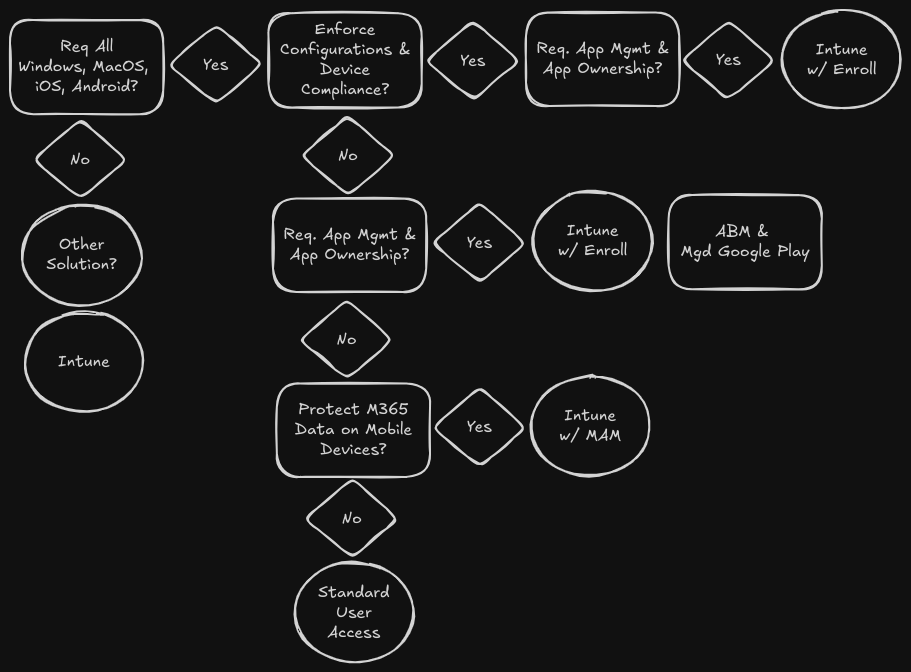
The chart below provides a bit of a decision tree starting from the top-left working your way outward. Where do you land?
What about BYOD (Bring Your Own Device)?
Other concerns will be if your company allows employees to use their own personal devices aka Bring Your Own Device (BYOD). BYOD can be quite the undertaking and separate policies and enrollment guidelines can be provided for employees opting to use their personal devices.
Another tip…Intune Management can always be accessed quickly via https://aka.ms/intune.